How to collect photos from your wedding guests (the easy way)
Your photographer covers the planned moments. Your guests cover the unplanned ones. Here's how to make uploads effortless and end up with hundreds of memories your photographer would never have caught.
The short version:
- Your photographer captures roughly 5% of the moments at your wedding. Guests have phones for the other 95%.
- The number of guests who actually upload depends on one thing. How easy you make it. Friction kills uploads.
- Open uploads on a single QR code. Skip the login. The grandparents’ phones count too.
Your photographer is brilliant. They’ll capture the first kiss, the first dance, the speech that made everyone cry. They’ll also be in the wrong room when your nephew steals the cake topper, when your dad and uncle do an unplanned dance-off, and when your maid of honor finally cracks at midnight singing into a champagne flute.
You only get those moments back if your guests bring them to you. Most weddings don’t. Photos sit on 150 different phones and slowly disappear into camera-roll oblivion. Here’s how to actually get them.
Why guest photos matter more than you think
A typical wedding photographer delivers between 600 and 1,200 photos. That sounds like a lot. It’s not.
Across an 8-hour wedding with 150 guests, the actual number of moments is closer to 10,000. Every conversation, every reaction, every quiet aside between cousins. The photographer can’t be everywhere. They make smart choices about where to point the camera, but they’re choosing.
Your guests aren’t choosing. They’re snapping reflexively. Pets, kids, drunk speeches, the dress detail that the photographer missed because they were getting the cake shot. Those photos are usually better than yours-and-the-photographer’s not because of skill. Because of access.
If you’re still picking your gallery host, our guide on sharing wedding photos covers what to look for so guest uploads don’t get lost.
The three reasons guests don’t upload
Every host underestimates this. You’ll send the QR code, you’ll mention it in a speech, and you’ll still get 6 uploads from a wedding of 200 people. Here’s why.
1. Friction. Every step you add (download an app, create an account, verify email, find the right album) cuts uploads by half. Most platforms ask for all four. By the time the guest has done two of them they’ve moved on.
2. They forgot. Guests don’t go to your wedding planning to upload photos. They go to celebrate. By the time they’re home unpacking the dress shoes, your gallery is the last thing on their mind.
3. Phone storage anxiety. Older guests especially. Their iCloud is full. They worry that uploading 30 photos will somehow eat their data plan. Without reassurance, they stay parked.
The good news. All three are solvable.
The setup that actually works
Forget the perfect signage. Forget the curated welcome bag note. The setup that actually drives uploads is brutally simple.
One QR code. One URL. No login.
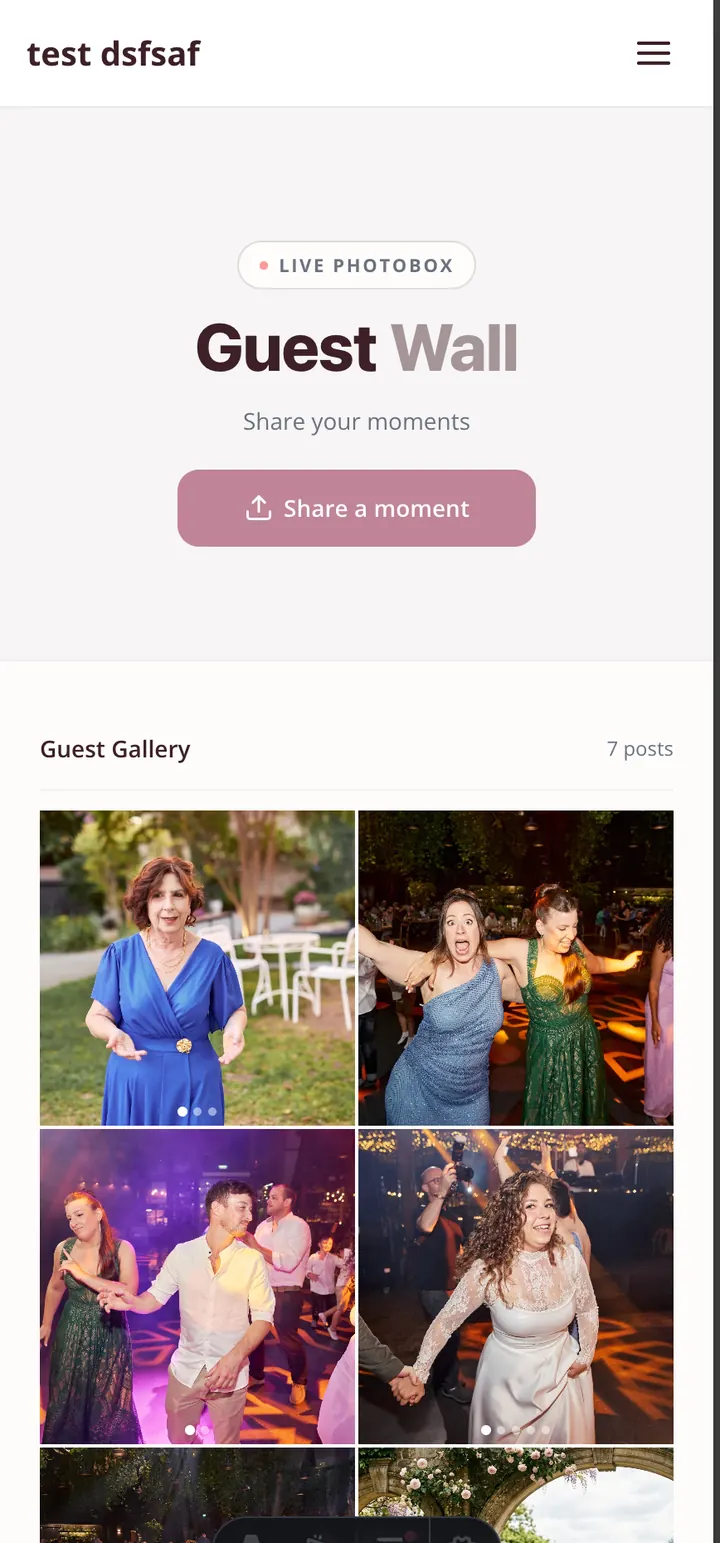
Print it on the table cards. Put it on the welcome sign. Mention it once during the toasts. Then leave it alone.
When guests scan, they should land on a page that says “Add your photos” and a button. They tap. They select photos. They tap again. Done. Total time: 15 seconds.
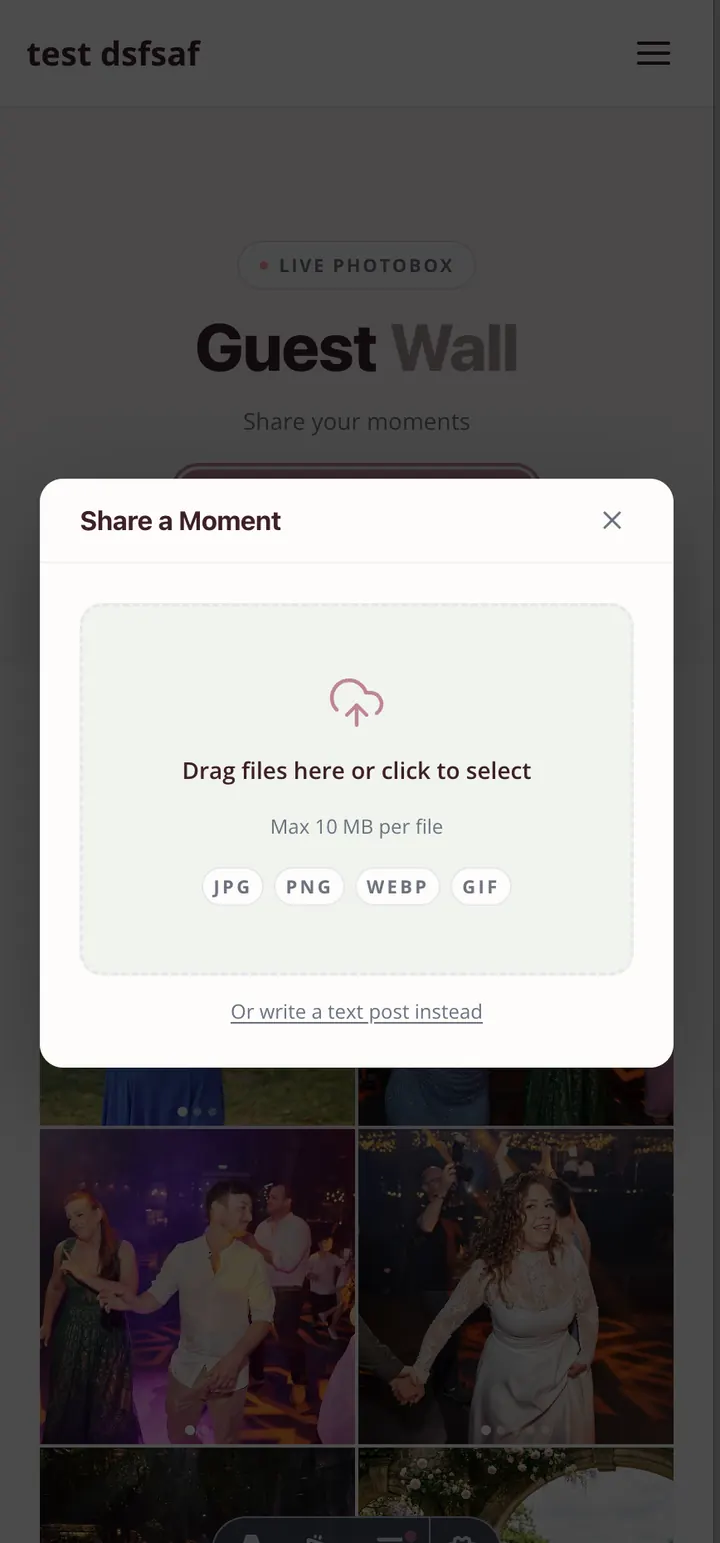
If your platform makes them sign in or download an app, swap platforms. The guests who’ll bother are not the guests with the photos you actually want. (Aunt Rita has the gold candids and she’s not signing up for anything.)
Where to put the prompt
Guests don’t upload during the event. They upload either right after, or never. Use that.
During the event (low priority): A small QR sign on the welcome table. A line on the table cards. One mention from the MC.
Right after the speeches (high priority): The MC says one sentence. “Before you head to the dance floor, take 30 seconds to scan this QR code and drop your favorite photo from tonight.” That single sentence outperforms every other channel. Not because everyone uploads then, but because they remember it later.
The morning after (very high priority): Send a text or email with the QR code and a one-line prompt. “Send us anything from last night. Even the blurry ones. Especially the blurry ones.” Most uploads land within 48 hours. After 72, the curve flattens hard.
One week later (catch the stragglers): One more text. Don’t apologize. “Last call on photos. We’d love yours.” You’ll get a fresh wave from people who meant to and forgot.
What guests actually upload (and what to do about it)
Here’s what the photo set looks like after a real wedding gallery opens uploads.
- 30% are great candid moments. Real laughs, real tears, the moments your photographer wasn’t standing for.
- 40% are decent. Group selfies, table shots, the kid eating cake.
- 20% are blurry, dark, or duplicates of the same moment from 10 different angles.
- 10% are accidental. Someone’s lock screen, a black frame, an upside-down ceiling shot.
The instinct is to filter ruthlessly. Don’t. The 20% blurry ones include the toast that the photographer was changing lenses for. The 10% accidental ones include three of the most memorable photos of the night, by complete accident.
Filter only the truly unviewable. Group everything else into a “Candids” album so the highlights aren’t buried. Let your future self curate when the emotion has settled.
The privacy and consent piece
Some guests don’t want their face in a public gallery. Address it once, upfront, in a way that lands.
In your post-event email, write four sentences.
“The gallery is open. Anyone with the link can view it, but no one outside our guest list has the link. If a photo of you ends up there and you’d rather it didn’t, just reply to this email and we’ll hide it. We won’t ask why.”
That’s enough. Most guests won’t think twice. The few who care will reply, and you’ll quietly hide their photos. No drama, no policing, no awkwardness.
If your gallery uses face search, the privacy considerations are slightly different. Worth a read before you turn that feature on for guests.
What to do with the haul
Two months later you’ll have 800 to 1,500 photos from guests in addition to your photographer’s set. That’s a lot. Here’s how to make sure the best ones don’t disappear.
- Curate a “guest favorites” album within the gallery. 50 to 100 best shots, picked from the guest pile. This is the album you’ll actually open in five years.
- Print the unexpected ones. The candid your aunt took during the speeches. The one your cousin caught of you laughing at something off-camera. These are the prints that mean the most. Frame them.
- Send a thank-you to your top three uploaders. A handwritten card, even short, to the friends who showed up with 40+ photos each. They’ll be the ones at your anniversary.
- Back it up. Same rule as everything else. Download the original-quality archive a year out, save in two places, calendar a reminder for the year after.
The before-and-after
Without guest uploads, your wedding photos are a beautiful but partial record. The version your photographer chose to show you.
With guest uploads, you get the wedding from inside the wedding. The angles only your friends had. The moments you didn’t know happened.
That’s the version you actually lived. Make sure you have it.
Want a gallery that makes guest uploads this easy? See how Eventimio’s photo gallery works. One QR code, no login, full-resolution downloads, and your originals stay yours forever.