How to handle dietary restrictions at a wedding (without losing your mind)
How to ask guests about dietary needs, organize the responses, and share with your caterer in a way that prevents day-of disasters.
The short version:
- Ask once, on the RSVP card. Don’t ask twice. Don’t ask vaguely.
- Translate every answer into one of seven categories. The caterer doesn’t read prose.
- Plan for 5–10% of guests to have a real restriction. Buffer for one no-RSVP guest with an allergy.
You’ll send the invitations. You’ll get the RSVPs. Three days before the wedding, your maid of honor will text: “Forgot to mention, my new boyfriend has celiac disease — is that okay?”
This is normal. Dietary restrictions are the single most under-planned part of weddings, partly because hosts feel awkward asking and partly because guests forget they were asked. Here’s how to actually get this right.
Why this matters more than you think
It’s tempting to think dietary restrictions are a small issue. They’re not. They’re the part of your wedding that has the highest chance of producing a memory you actively don’t want.
The risks if you get it wrong.
- A guest with a serious allergy has a medical incident at the reception. You will remember this for the rest of your life.
- A vegetarian guest sits with an empty plate during dinner. Other guests notice. The bride hears about it.
- The kosher/halal/religious-observant guest eats nothing because the kitchen prepared “vegetarian” but cross-contaminated everything.
- The caterer charges for a per-head meal that the guest couldn’t eat — you paid for waste.
The fix takes about 30 minutes of admin spread across the planning timeline. It is the highest-leverage 30 minutes you’ll spend on guest management.
Ask once, on the RSVP card
The single most important rule. Ask about dietary restrictions on the RSVP card, not in a separate email two months later.
Why: the moment a guest is RSVPing is the only moment you have their full attention on your wedding. Every other touchpoint, they’re in their day-to-day life. They won’t reply to a separate email.
Phrasing that works.
“Any dietary restrictions or food allergies we should know about?”
That’s it. Don’t list categories. The list will miss someone’s specific situation, and the categorizing happens on your end, not theirs. (If you’re building the RSVP tracker now, make sure this field is required.)
Phrasing that doesn’t work.
- “Are you vegetarian, vegan, or have other restrictions?” — Misses gluten, kosher, halal, allergies.
- “Please let us know any preferences.” — “Preferences” implies optional. Get answers like “I prefer chicken.” That’s not what you asked.
- “Are you vegetarian?” — Single-axis. Useless for multi-restriction guests.
The seven-category translation
Guests will give you free-text answers. Some will be clear (“vegan, no nuts”). Most will be ambiguous (“I don’t really eat meat much”). Your job is to translate every answer into one of seven categories your caterer can act on.
| Category | What it means |
|---|---|
| Vegetarian | No meat, no fish. Eggs and dairy okay |
| Pescatarian | Fish okay, no meat |
| Vegan | No animal products. No dairy, no eggs, no honey |
| Gluten-free | Medical (celiac) or preference. Caterer needs to know which |
| Kosher / halal / religious-observant | Specific preparation rules. Often needs a separate caterer or pre-arranged kitchen |
| Allergy | Tree nuts, peanuts, shellfish, dairy, soy, eggs, wheat. Always treat as life-threatening unless told otherwise |
| No restriction | Eats everything |
Not in this list: “I don’t eat much red meat.” That’s a preference, not a restriction. File as “no restriction” and move on.
When to ask follow-up questions
Three categories where you should follow up before sending the list to the caterer.
1. Allergies. Reply to every allergy with a specific question.
- “Just to confirm: is this an anaphylactic-level allergy or a sensitivity? We want to make sure the kitchen handles it correctly.”
If anaphylactic, flag the guest in your tracker. The caterer needs to prep their food separately, possibly in a different area. The wedding planner needs to know which table.
2. “Gluten-free.”
- “Quick check: is this for a celiac diagnosis or general preference? It changes how the kitchen handles cross-contamination.”
Celiac means the kitchen needs separate utensils, separate prep surfaces, no shared fryers. Preference means a gluten-free option on the plate is enough.
3. Religious observance.
- “Is there anything specific we should know about preparation? We’re working with [caterer name] and want to get it right.”
Levels of observance vary widely. Some kosher-observant guests will eat a vegan plate prepared by any caterer; others need a separately certified kitchen. Don’t assume — ask.
The format your caterer actually wants
Caterers don’t read prose. They want a count, by category, with names attached for service.
The format that works.
TOTAL CONFIRMED: 142

Vegetarian: 8
- Sarah K (table 4)
- David M (table 4)
- ...

Vegan: 3
- Rachel S (table 7) — also no nuts
- ...

Gluten-free (celiac): 2
- Maya L (table 2) — separate prep required
- ...

Allergies (anaphylactic):
- James R (table 9) — peanuts
- Anna T (table 11) — shellfish

No restriction: 124
Send this 2 weeks before the wedding alongside the final headcount. Update if anything changes in the final week.
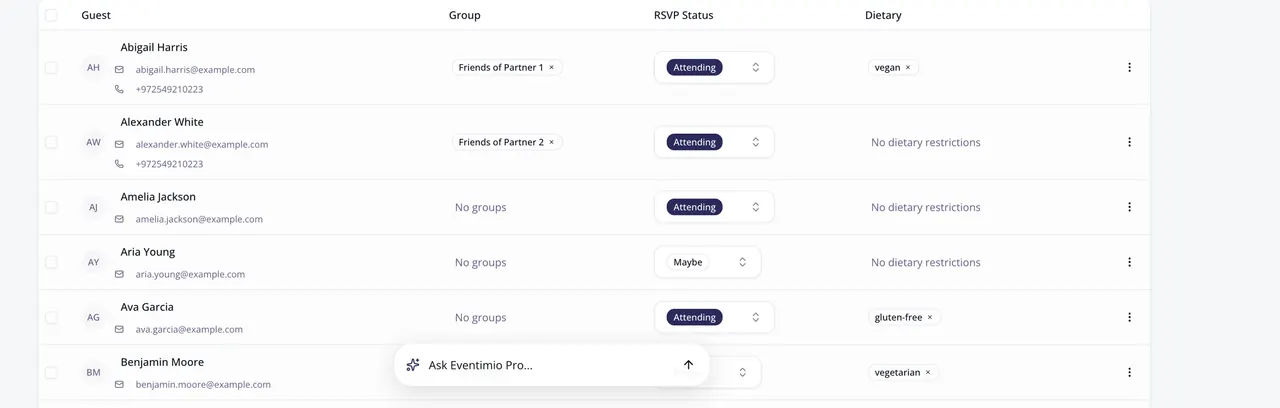
If you’re using Eventimio for guest management, this report generates automatically from the same RSVP data — no copy-pasting between spreadsheet and email.
What to do for the day-of
A few things make the difference between “managed correctly” and “perfect.”
Place card markers. A subtle dot or symbol on the place card so servers know who has the special meal without making it a public announcement. Color-coded works well: green dot = vegetarian, blue dot = vegan, red dot = allergy. Just make sure servers know the legend.
Brief the captain. The night-of captain (the head server) should have the dietary list in hand. They walk every guest’s plate. “Maya is the celiac at table 2 — confirm separate prep before serving.”
Mark the buffet, if you have one. Even at plated dinners, a cocktail-hour buffet exposes 100+ guests to allergens. Label everything. “Contains tree nuts. Contains dairy. Gluten-free.”
Brief the wait staff once. Five-minute pre-service standup. Where the allergic guests are sitting. Which kitchen prep is separate. What to do if a guest mentions a restriction during service.
The buffer for surprises
Despite perfect tracking, you’ll have at least one day-of surprise. The plus-one no one mentioned has an allergy. The friend forgot to RSVP. A guest changes their mind day-of.
Plan for this with three buffers.
- 2 extra vegetarian plates beyond your headcount, prepped and held
- 1 extra vegan plate for the surprise guest
- A “kitchen can prep this in 10 minutes” item for last-minute allergies — usually a simple grilled fish or chicken with no complex sauce
The total cost: maybe $80 in extra food. The benefit: one fewer crisis on a day where you can’t afford one.
After the wedding
Note any restrictions in your guest tracker for the future. The next event you host (anniversary party, baby shower, your friend’s wedding where you’re a planner), the same guests will likely have the same needs. Don’t make them re-explain.
Dietary management is one of those quiet wedding tasks that nobody notices when you do it right and everybody notices when you don’t. Build the system once. Trust the process.
One guest list, one dietary list, one source of truth. See how Eventimio handles guest management — the same data flows from RSVPs through dietary tracking to seating to the post-wedding thank-you list, with no spreadsheet drift.