How to share wedding photos with guests (without the WhatsApp chaos)
The full guide to sharing wedding photos with 150+ guests in a way they'll actually use. One link, full quality, no app downloads, no expired Drive folders.
The short version:
- Pick the gallery before invitations go out, not after the photographer delivers.
- Insist on full-resolution originals. Compressed sharing trashes 70% of the data.
- Make face-search the default. It’s the difference between guests engaging and guests giving up.
Your photographer just sent over 1,847 photos. Your aunt has 200 more on her phone. Three friends shared Drive folders. Two more sent WeTransfer links that already expired.
Now imagine your grandmother trying to find the photo of her holding the bouquet. Good luck.
A great wedding gallery isn’t about having the most photos. It’s about being the place where everyone who was there can find themselves, in less than ten seconds, six months later. Here’s how to actually pull that off.
Start with one place, decided early
The single biggest mistake hosts make. Not picking the gallery before the event. Photos start arriving from the photographer, the videographer, the venue, your maid of honor, your dad. By the time you sit down to organize them, half are buried in iMessage threads.
Decide on the gallery before invitations go out. Tell your photographer where to upload. Put a QR code on the table cards so guests upload to the same place. Mention the URL in your thank-you email.
One link. One source of truth. Everything else is chaos with a Google Drive icon on it.
If you want a step-by-step plan, the wedding photo gallery checklist walks the timeline from 8 weeks out to a year after.
Don’t lose the originals
Phone messaging apps compress photos. WhatsApp drops them to 25% of original quality. iMessage isn’t much better. Drive and Dropbox preserve the file, but most hosts share the thumbnail link by accident.
For an event you’ll look back on for decades, this matters.
- Ask your photographer for the original JPGs, not the web previews.
- If you’re collecting from guests, accept full resolution if the platform allows it.
- Avoid screenshotting photos to “save” them. You’re throwing away 70% of the data.
Your wedding gallery should still print at poster size in 2046. That only works if you start with the originals.
Organize by moments, not minutes
Chronological is fine for the photographer’s archive. It’s terrible for guests.
When your cousin opens the gallery, she’s not thinking “show me 4:17 PM.” She’s thinking “show me the speeches.” Group photos into albums that match how people remember the day.
- Getting ready
- Ceremony
- Group portraits
- Speeches and toasts
- First dance
- Late night / dance floor
- Candids
If your platform supports it, let the same photo live in multiple albums. The bouquet toss photo belongs in both “candids” and “the moment we caught Sarah by surprise.”
Make finding faces effortless
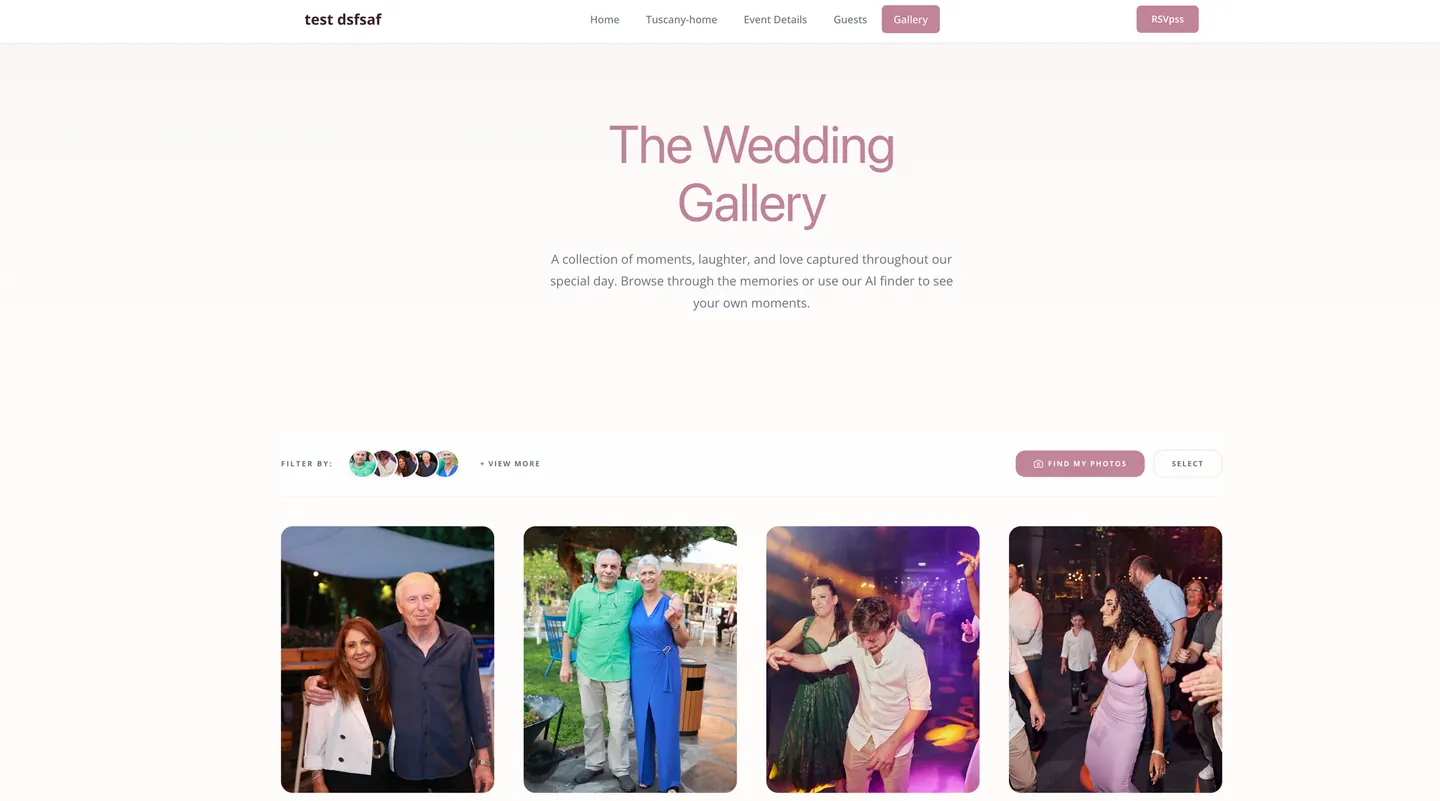
This is the part most galleries get wrong. There’s no shortcut to scrolling through 1,800 photos hoping to spot yourself. Unless your gallery groups photos by the person in them.
Modern galleries do this automatically. You upload the photos, the system detects faces, and within a few minutes guests can tap their own face and instantly see every photo they’re in. No tagging. No searching. No “wait, was I at table 4?”
If face search is new to you, start here — we wrote a separate guide on what to expect, how to set it up, and what to tell your guests about privacy.
This is the single feature guests thank hosts for the most. Grandma found her photos in 30 seconds. Without it, she would have given up at minute three.
Share without forcing an app install
If the only way to view the gallery is to download an app, half your guest list will never see the photos. The older half. The half whose stories matter most.
Your gallery needs to do four things.
- Open in a browser. Any browser. On any phone.
- Not require a login if you don’t want it to.
- Have a short, memorable URL or a QR code people can scan from a printed card.
- Let guests download photos in one tap, in full quality, without watermarks.
If grandma can’t view the photos with one tap from a text message, the gallery has failed.
Let guests contribute their own shots
The professional photos cover the planned moments. Guests cover the unplanned ones. The tear during the toast, the kid hiding under the table, the dance-off no one staged.
Open up uploads. The mix of professional and candid is what makes a gallery feel alive instead of like a brochure.
A few rules to set.
- Ask guests to upload before they leave the event, while it’s still fresh.
- Give them one URL or QR code, not a list of instructions.
- Skip the requirement to log in. Friction kills uploads.
- Moderate before you publish if you’re worried about content.
Privacy and the “please remove this” requests
You’ll get them. Someone hates how they look in one photo. A guest doesn’t want to be tagged. Someone’s ex made it into a candid by accident.
Have a plan before you publish.
- Decide whether the gallery is public, password-protected, or private to invited guests.
- Give guests a way to ask you to remove or hide a photo without a confrontation.
- Keep face grouping opt-in if your guest list includes anyone uneasy about it.
- Don’t share the gallery on social without asking the people in the photos.
Most platforms now let you toggle privacy settings without re-uploading anything. Use them.
Make sure it survives
The most heartbreaking thing we hear from couples. “Our wedding gallery is gone. The platform shut down.”
Before you commit to a gallery host, ask three questions.
- Can I download every photo in original quality whenever I want?
- If I stop paying, do I lose access immediately, or do I have a grace period?
- Are the photos backed up, or am I the backup?
Set a reminder for one year after your event to download the full archive. Future-you will be grateful.
The 30-second test
Here’s how to know if your gallery is actually working. Ask one guest who isn’t tech-savvy to find a specific photo. If they can do it in under 30 seconds, you’ve built something good. If they sigh, scroll, and give up. Fix the gallery before you celebrate it.
A great wedding gallery doesn’t make guests work for the memories. It hands them right back.
Want to see what this looks like in practice? Open our demo gallery — same face search, same one-tap downloads, same branded URL your guests will actually use.