Live QR check-in for events: know who arrived in real time
See exactly who has arrived while your event is still happening. Guests show a QR, your front desk scans or searches by name, and attendance updates live.
The short version:
- Eventimio now gives you live QR check-in from the same guest list you already use for RSVPs.
- Guests show their personal QR at the entrance. Your front desk can scan, search by name, or check in a group manually.
- You see who arrived while the event is happening, so you can make decisions before they stop mattering.
The old way to track arrivals is a clipboard at the entrance and a messy update after the event.
That tells you who came. Eventually.
But during the event, “eventually” is not good enough. You need to know what is happening now. Are most guests already inside? Did the VIP table arrive? Can dinner start? Is the shuttle still missing? Are you waiting for 40 people or only 8?
Live QR check-in changes the guest list from a planning document into a real-time view of the room.
How live check-in works
Eventimio already tracks your guests, RSVPs, plus-ones, dietary needs, and seating. Check-In uses that same information at the entrance.
No separate kiosk app. No second spreadsheet. No retyping the guest list into another tool.
The flow is simple:
- A guest confirms they are attending.
- Eventimio prepares a personal check-in QR for that guest or party.
- On event day, the QR appears on the guest’s RSVP confirmation page.
- Front-desk staff open the Check-In tab.
- Every scan or manual check-in updates the arrival count live.
For guests, it feels easy: open the invitation or RSVP page, show the QR, walk in.
For your team, it means the entrance is no longer disconnected from the rest of the event.
What your front desk sees
The Check-In tab is built for fast work at the door.
At the top, staff see live progress: how many guests or parties have arrived, how many total people are checked in, and how close you are to the expected count.
Below that, they get the tools they actually need:
- Scan QR when a guest has their code ready.
- Search by name when someone cannot find the QR.
- Manual check-in when staff need to mark a guest or party as arrived.
- Bulk check-in when several guests arrive together.
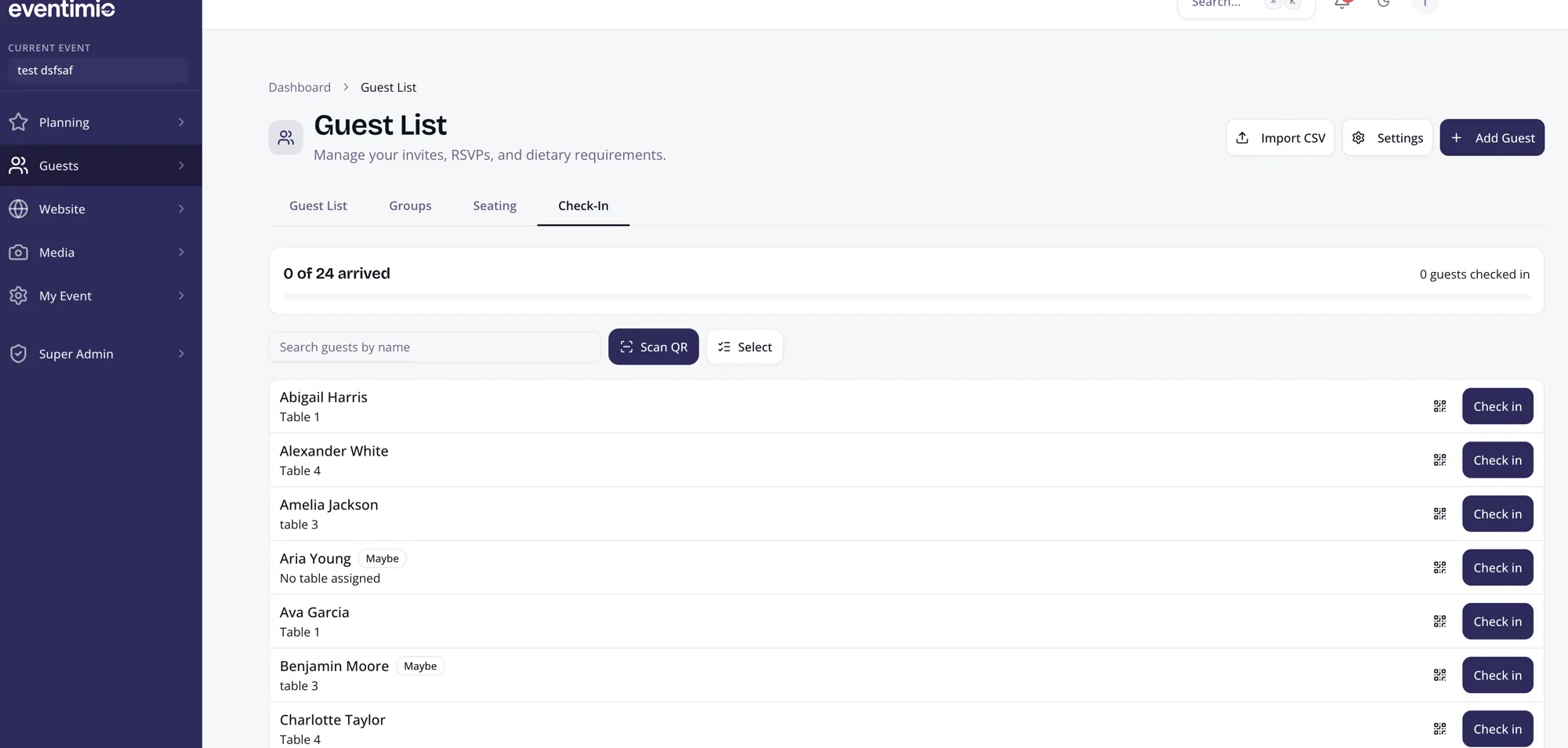
One person can run a small wedding from a phone. A larger event can have multiple staff members checking people in from different devices. When one person marks a guest as arrived, everyone else sees the update.
That is the important part: one live source of truth.
No clipboard at the door, planner group chat, and spreadsheet all drifting apart.
Why this matters during the event
Live arrival data helps your team make better calls while the night is still moving.
Start dinner with confidence.
If most guests are checked in, you can move toward dinner. If a large number is still missing, you can see that clearly instead of guessing from how full the room feels.
Know when important guests arrive.
You do not need to send someone walking through the venue to check whether key guests are already inside.
Coordinate vendors faster.
The planner, venue, photographer, and catering team can work from the same arrival picture. “We’re waiting on 18 guests” is much better than “it still feels a little light.”
Handle no-shows cleanly.
After the event, the attendance report is already there because the data was captured live.
Support bigger operational events.
For conferences, retreats, galas, and private events, knowing who is on site can also help with transportation, security, and emergency planning.
The setup is simple
If your guest list already lives in Eventimio, there is not much to configure.
1. Confirm the attending list.
Anyone marked as attending appears in Check-In. Declines stay out of the way.
2. Check plus-ones and party sizes.
If a guest is arriving with family or a plus-one, the front desk can check in the right number of people.
3. Give front-desk access to the right people.
The Front Desk role keeps the entrance focused. Staff can handle arrivals without getting access to the rest of your event setup.
4. Tell staff the simple rule.
Scan the QR when the guest has it ready. Search by name when they do not.
That is all most events need.
QR when possible, search when needed
QR check-in is fast, but real entrances are messy.
Phones die. Guests arrive in groups. Someone opens the wrong message. Someone says, “I’m with Dana,” and expects the front desk to understand.
That is why Eventimio does not force every arrival through one perfect path. The QR is there for speed. Name search and manual check-in are there for real life.
The result is a smoother entrance and better information for everyone managing the event.
The real benefit
This is not only about replacing paper with QR codes.
It is about knowing what is happening while you can still act on it.
When arrivals update live, the guest list becomes useful during the event itself. You can see who is here, who is missing, and whether the room is ready for the next moment.
That is the difference between checking attendance after the event and running the event with confidence.
Want live check-in on the same guest list you already use for RSVPs? See how Eventimio handles guest management. Invitations, RSVPs, seating, dietary needs, and check-in stay connected in one place.