Wedding RSVP checklist: how to track every yes, no, and maybe
A timeline-based checklist for sending invitations, chasing late RSVPs, and getting a final headcount your caterer can rely on.
The short version:
- Set the RSVP deadline at 4 weeks before the wedding, not 2. Late responses are guaranteed.
- Track three buckets: yes, no, hasn’t responded. Don’t let “maybe” exist.
- The day you tell the caterer the final headcount is the day you stop chasing.
Timing here reflects US/UK wedding norms. Israeli weddings run on a much tighter window — final headcount typically locks one week before, not four. If that’s you, the Hebrew version of this guide has the right timeline.
The RSVP phase of wedding planning is where the most time gets quietly burned. People mean well and forget. Your aunt sent her response to the wrong address. Your college friend assumed they were invited because of the save-the-date. The invitations mailed three weeks ago and you have 12 responses out of 150.
This is normal. Here’s the timeline that gets you to a clean final number without the spiral.
What guests actually see
Here’s what the digital RSVP looks like on the guest’s side. First name, “Will you join us?”, two big buttons, and immediately after that, dietary options as tap-able chips. Everything on one page, no screen switching, no account needed. Your grandparents finish this in 15 seconds.
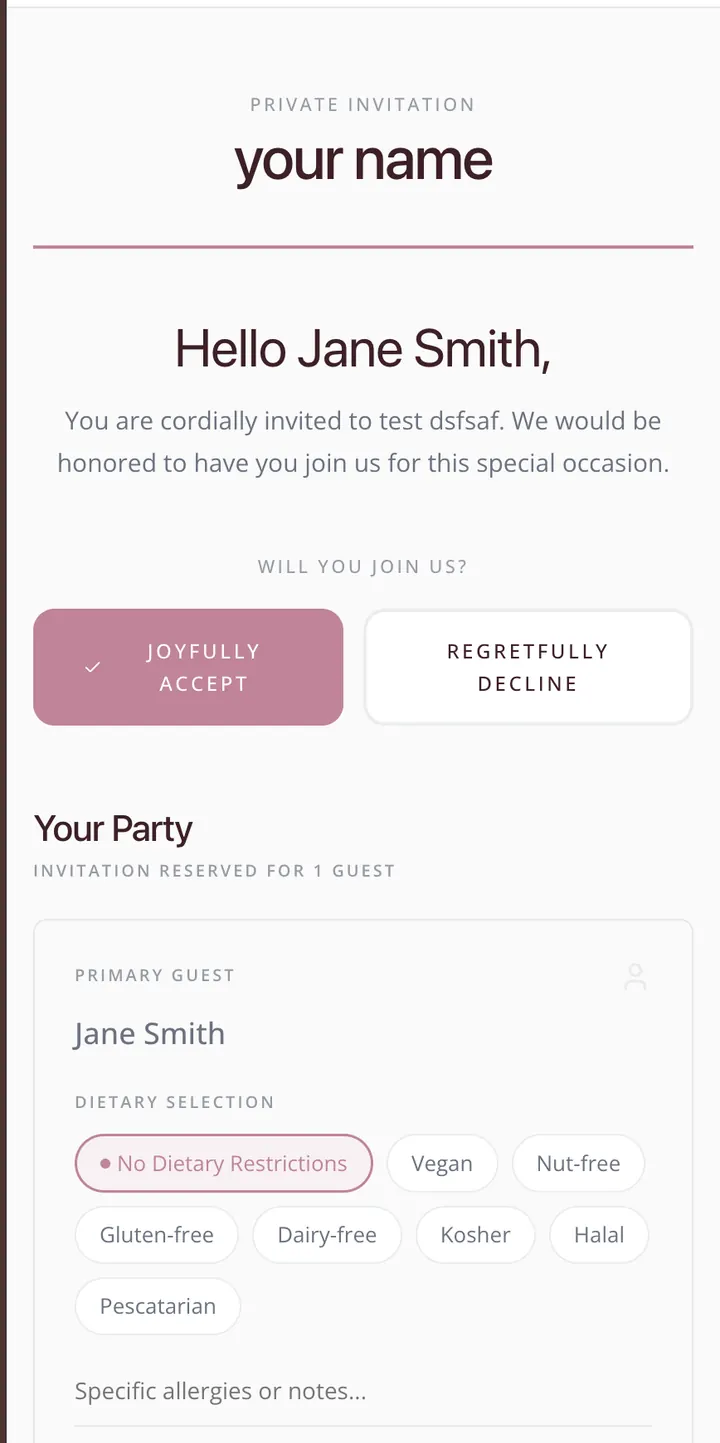
The split between the big yes/no buttons and the smaller dietary chips is intentional. Most guests just tap “Joyfully Accept” and move on. Anyone with a restriction sees the chips right there, no separate prompt needed. The “specific allergies” field catches the small percentage who need to write something custom.
Before invitations go out
Pick a single tracking tool. Not three. One spreadsheet, one app, one source of truth. Your partner needs to see the same status you see, in real time. (If you’re still building the guest list, start here.)
- One tool, one source of truth (Eventimio, a single shared spreadsheet, or a single dedicated app)
- Status field with three states:
invited,attending,declined. No “maybe” - Address field for every guest (you need it for the invitation; you’ll need it again for thank-yous)
- Plus-one field, with the plus-one’s name where known
- Side field: yours / your partner’s / parents’ (for budget reporting and seating logic)
- Meal preference + dietary restrictions field (covered in the dietary guide)
Set the RSVP deadline 4 weeks before the wedding.
Two weeks isn’t enough. People won’t have responded, you’ll be panicking, and you can’t give the caterer a clean number. Four weeks gives you the buffer to chase the late ones without it feeling like an emergency.
8 weeks before the wedding
Mail the invitations.
Aim for 8 weeks out for local guests, 10 weeks for destination weddings or guests who’ll need to fly.
- Triple-check the RSVP deadline on every invitation card
- Confirm the RSVP method works: card-and-stamp, dedicated email, or wedding website
- If you’re using a digital RSVP, send yourself a test invitation and complete the flow end-to-end
- Pre-fill addressed envelopes with stamps if you’re collecting paper RSVPs (response rate jumps dramatically)
Build the tracking dashboard.
- Mark every guest’s status as
invitedin your tracker - Set a reminder for 2 weeks from now to start tracking responses
- Decide who answers RSVP questions: just you? Both of you? Add a wedding party member?
6 weeks before
First wave of responses lands. You’ll get 30–40% of total responses in the first 2–3 weeks.
- Update the tracker daily (5 minutes, end of day, both partners can see)
- Check the addresses on returned cards — if anyone’s looks wrong, fix it now
- Note any name spellings you got wrong; you’ll thank yourself at the seating chart
- Forward digital responses to the tracker if they’re not auto-syncing
5 weeks before (deadline week minus 1)
Time to chase the silent majority.
Roughly half your invitees will not have responded yet. This is normal. Most will respond in the next 7–10 days if you nudge them.
- Send a friendly reminder text to anyone who hasn’t responded. “Hey! Just checking — did you get our invitation? RSVP deadline is next week, would love to know if you can make it.”
- Don’t apologize. Don’t make it awkward. People are busy and forget
- If a guest’s invitation card came back as undeliverable, find a new address now
4 weeks before (the deadline)
Lock the headcount window.
The official RSVP deadline is today. You’re not done — but the official chase ends here.
- Final tracker review with your partner
- List of everyone still in
invitedstatus — these are the late responders - Draft the second-reminder message: “Hi! We’re finalizing numbers with our venue. Could you let us know by Friday if you can make it?”
- Send the second reminder by text or call (not email — emails get missed at this stage)
3 weeks before
Convert the stragglers.
You’ll close most of the remaining responses this week. The rest are people who genuinely have no idea yet, can’t decide, or have lost the invitation.
- Direct text or call for everyone still unresponsive
- If someone calls or texts to say “we’ll let you know” — set a hard deadline. “We need to confirm with the venue by next Wednesday. Sorry to push, can you give us a yes or no by then?”
- Anyone still unresponsive after this week, mark as
declinedfor headcount purposes (you can update if they show up later, but don’t include them in the catering count)
2 weeks before — final headcount
This is the day you stop chasing.
- Lock the headcount with the caterer (most caterers want this 10–14 days out)
- Send dietary restrictions and meal choices to the caterer in their requested format
- Lock the seating chart based on confirmed yes-attending guests only
- Notify the venue of the final number
- Update your wedding planner with confirmed numbers
After this date, late additions or changes become exceptions, not the norm. Real ones (hospitalizations, last-minute travel issues) you can absorb. “Oh I forgot to RSVP, can I still come?” — depends on your generosity, but understand each late add adds direct cost.
Final week
- Re-confirm the headcount with the caterer 48 hours before the wedding
- Confirm any plus-ones that were uncertain
- Finalize escort cards / place cards based on the locked list
- Print or share the seating chart with your venue and planner
Day-of and after
- Track actual attendance vs. RSVPs (one person can do this from the back of the venue)
- Note no-shows for the thank-you list (they still get one, just shorter)
- Mark gift-givers in your tracker as gifts come in (during, after — they’ll trickle for months)
One week after the wedding:
- Send “thank you for celebrating with us” to everyone who attended
- Note specific gifts so the longer thank-you cards are personalized
- Anyone who declined but sent a gift gets their own thank-you note
What good RSVP tracking gives you
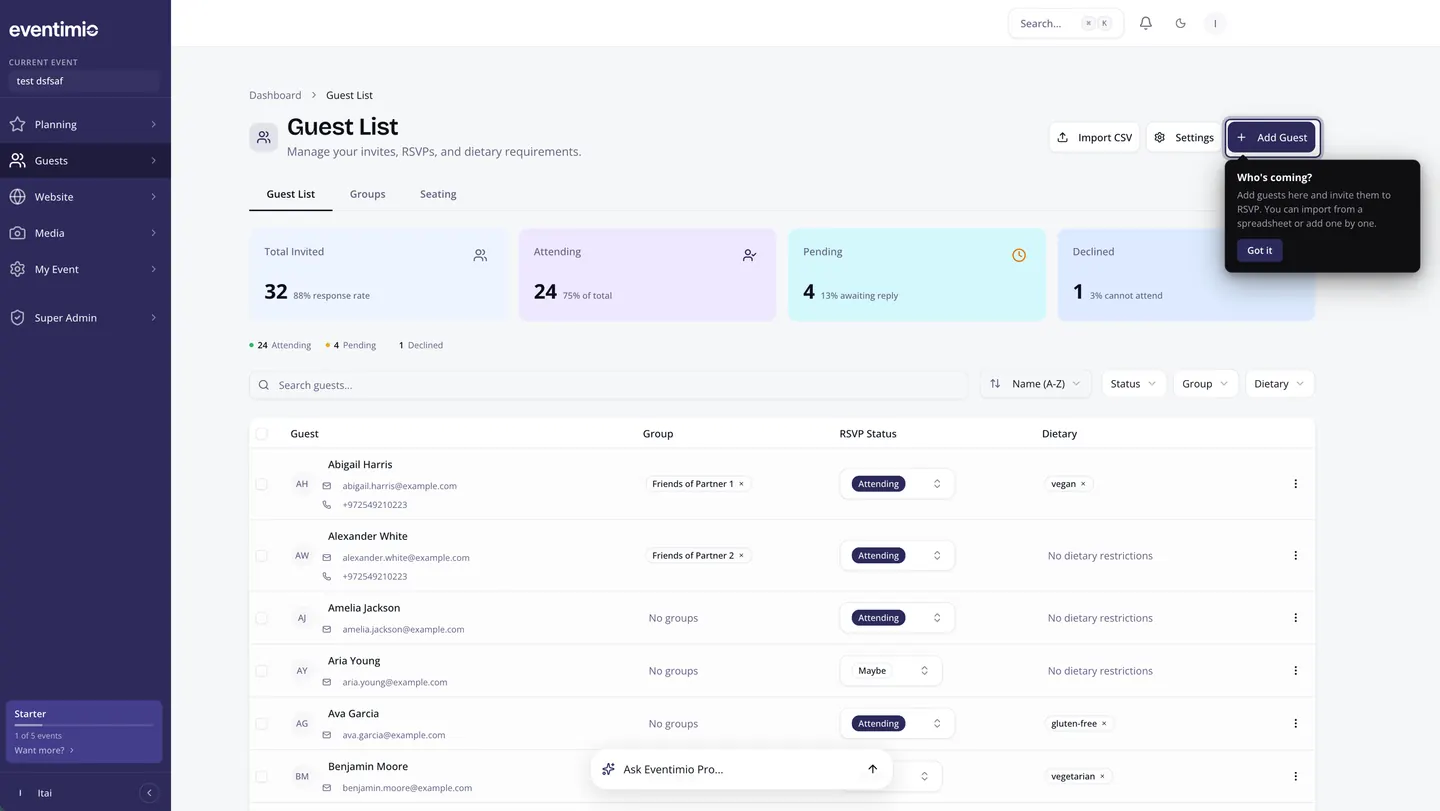
A clean RSVP system isn’t just about the numbers. It’s the foundation for:
- The dietary list going to your caterer accurately. (Detailed guide here.)
- The seating chart based on real attending guests, not aspirational ones
- The thank-you list without missing anyone
- The gallery share after the wedding — you have everyone’s email or phone for the link
Skip the dashboard, and every one of those gets harder. Build it once, use it five times.
Want this dashboard already built? See how Eventimio handles RSVPs. Same list flows through invitations, RSVPs, dietary, seating, and thank-yous. Update once, everywhere updates.